
2026 Best 360 Degree Swivel Stand Buying Guide?
Choosing a 360 degree swivel stand now involves more than checking its rotation range. Buyers must evaluate stability, screen weight, mounting compatibility, cable movement, and long-term wear. A smooth turn is useful, but a wobbling base quickly becomes frustrating.
IDC’s Worldwide Quarterly PC Monitor Tracker reported approximately 125.5 million monitor shipments globally in 2024. That volume shows the continuing importance of display equipment and its supporting accessories. However, dedicated market data for swivel stands remains limited. This gap makes product claims harder to verify. It also means buyers should inspect technical specifications instead of trusting attractive product photos.
Ergonomics should guide the decision. Cornell ergonomics researcher Alan Hedge advises, “The top of the monitor should be at or slightly below eye level.” A well-designed 360 degree swivel stand can support that position during shared viewing, presentations, or desk reconfiguration. VESA mounting information, load ratings, and rotation-lock mechanisms deserve careful attention. A heavy 32-inch display should not glide across a thin, lightweight base. That mistake is easy to make.
This 2026 buying guide compares practical features, measured stability, adjustment range, and installation details. It also considers small issues, such as a cable twisting after repeated turns. Those details matter. Some recommendations may still depend on your desk depth, monitor design, and personal posture. No stand fits every workspace perfectly. A careful choice usually outperforms the cheapest impressive-looking option.
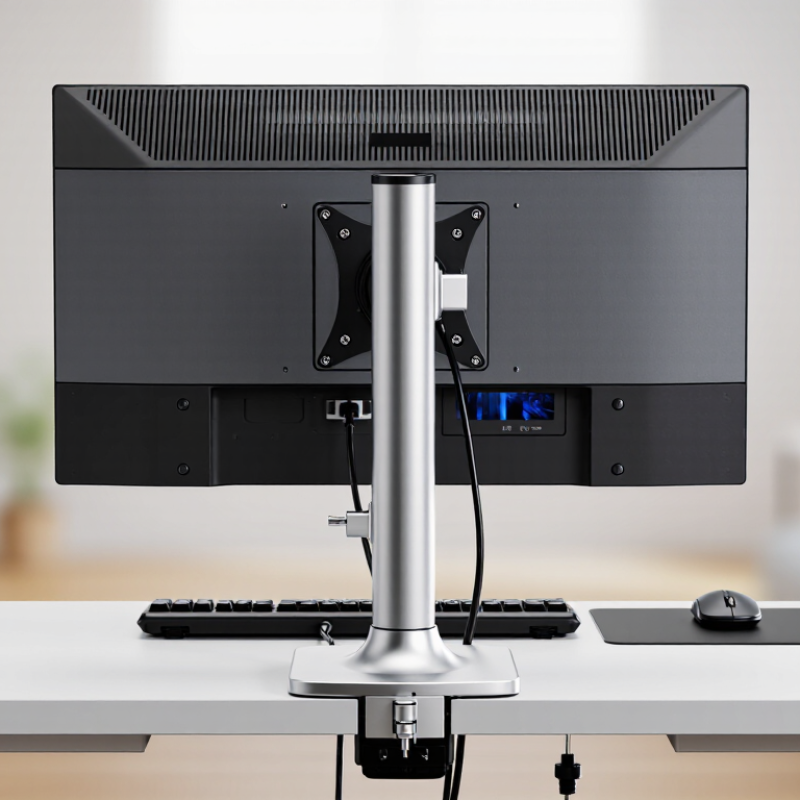
Define 360° Swivel Stand Types by VESA Mounting Standards: 75×75 to 200×200 mm
2026 Best 360 Degree Swivel Stand Buying Guide?
A 360° swivel stand should be selected by its VESA mounting pattern, not appearance alone. VESA measures the distance between four mounting holes on the display’s rear panel. Common sizes range from 75×75 mm to 200×200 mm. Smaller 75×75 and 100×100 patterns often suit compact monitors. Larger 200×200 patterns usually support heavier screens, but weight limits still matter.
In practical installations, I check three details before choosing a stand: VESA size, display weight, and screw depth. A 100×100 mm screen may fit physically, yet exceed the stand’s safe load. That distinction is easy to miss. Some displays use recessed holes, requiring spacers or longer screws. Do not force the hardware. It can damage the mounting points.
VESA compatibility also helps define stand types. Fixed-base swivel stands suit desks needing simple horizontal rotation. Clamp-mounted models save surface space and work well beside narrow workstations. Wall-mounted swivel arms provide wider movement, but their wall strength and extension length need careful review. A full 360° claim may describe rotation around the pole, not unlimited screen movement in every direction. Check the adjustment range. I have seen buyers focus on rotation and overlook cable tension. Leave enough slack for HDMI, power, and USB cables. Even a correct 200×200 fit can feel unstable when the screen is top-heavy. The specification is useful, but real balance deserves a second look.



Get in touch with us,
We will contact you shortly!
What is the difference between Unline(Non-Epoxy Coated) or Lining(Epoxy Coated) Metal Drum?

What are Unline(Non-Epoxy Coated) and Lining(Epoxy Coated) drums compatible with?
What is the difference between Grade A and Grade B Metal Drum ?
What content is suitable to fill in a Recon Grade A or Grade B Drum?
What is the difference between Open Top and Close Top Drums and their usage?
What type of content are Metal or Plastic Drums suitable for?
Will there be any contamination in the reconditioned metal, plastic drums or IBC tanks?
What is the drum gauge(thickness) and weight for reconditioned metal drums?
Do you sell New Packaging Products too?
What additional services do you provide apart from selling reconditioned and new containers.?
Do you offer labelling and silkscreen on the containers ?
Are you able to ship overseas ?
Leading the Way
to Carbon Neutrality